n8n newsletters AI summariser
Automatically summarise newsletters and receive weekly digests via email
For anyone drowning in newsletter subscriptions, first of all, you should probably unsubscribe from those you don’t ever read. Anyway, this workflow fetches unread newsletters from Gmail, intelligently summarises them using Perplexity AI, and delivers a beautifully formatted digest email every week. Save hours reading—get the key insights delivered to your inbox instead.
The workflow skips promotional content and focuses on actionable insights. It also preserves YouTube links mentioned in newsletters and detects the newsletter’s language automatically for native-language summaries.
Here’s a visual overview of the workflow:
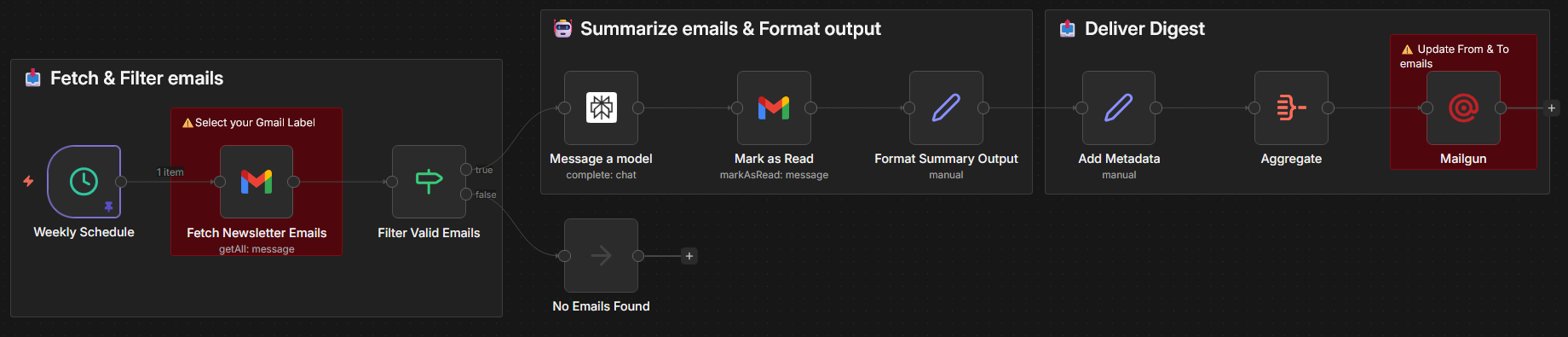
Table of contents
You can add the workflow directly into your n8n instance by importing the JSON from URL: https://gitlab.com/ioiste/blog/-/raw/main/assets/2026-01-06-n8n-newsletters-ai-summariser/n8n-newsletters-ai-summariser-workflow.json
How it works ↑
- Weekly trigger: Every Saturday at noon, the workflow automatically starts
- Fetch unread newsletters: Pulls all unread emails from a designated Gmail label (last 7 days only)
- Smart filtering: Skips empty or very short emails to avoid summarising non-content messages
- AI summarisation: Sends each newsletter to Perplexity AI (Sonar Pro model) for concise, structured summaries focused on main topics, key insights, announcements, and actionable items
- Prompt example that you can use:
You are an expert at summarising newsletter content. Please provide a concise, structured summary of the following newsletter content. Always include the title of the newsletter and summarise in the same language as the newsletter content. Things to focus on:
- Main topics covered
- Key insights or takeaways
- Important announcements or updates
- Any actionable items.
- Do not mention promotional content or ads.
- Keep the summary under 500 words and make it scannable with bullet points where appropriate.
- Use HTML for formatting.
- Include YouTube links to songs mentioned.
- Prompt example that you can use:
- Mark and format: Marks original emails as read, formats summaries with metadata (sender, date, subject), and aggregates all summaries
- Email delivery: Sends a single, beautifully styled HTML email via Mailgun containing all weekly newsletter summaries
Result: One email digest instead of dozens of unread newsletters cluttering your inbox.
Set up steps ↑
- Connect your accounts:
- Gmail (OAuth2 for secure email access)
- Perplexity API (for AI summarisation)
- Mailgun (for email delivery)
- Configure Gmail:
- Create or designate a Gmail label for newsletters (e.g., “Newsletters”)
- In the “Fetch Newsletter Emails” node, select your Gmail label
- Customize delivery:
- Set your desired summary day and time (default: Saturday 12 PM)
- Update recipient email address and sender email
- Optionally customize the Perplexity prompt (language, focus areas, format preferences)
- Test and activate:
- Manually trigger workflow to verify email delivery
- Activate the schedule to run automatically
Time investment: ~10–15 minutes after credentials are set up. Most configuration is copy-paste with minimal parameter tuning needed.
LLMs somewhat helped me write this post based on the implementation of the workflow.
Did you notice something wrong or have any questions? You can get in touch with me at [email protected].